User Guide
HealthSync helps optimize clinical efficiency with a keyboard-driven system for doctors to manage patient records, notes, medical certificates, and medication dispensing, all in one streamlined interface, enhancing care quality and focus in a busy clinical setting. While it has a GUI, most of the user interactions happen using a CLI (Command Line Interface).
Table of Contents
-
Table of Contents
- Quick start
-
Features
- Viewing Help Information:
help - Adding a patient medical record:
add - Listing all patient medical records:
list - Editing a patient medical record:
edit - Deleting a patient medical record:
delete - Locating a patient medical record:
find - Listing all appointment notes:
list-an - Listing a particular patient’s appointment notes:
list-an - Adding an appointment note:
add-an - Editing an appointment note:
edit-an - Deleting an appointment note:
delete-an - Clearing all entries:
clear - Undo previous commands:
undo - Archiving Data Files:
archive - Exiting the program :
exit - Saving the data
- Editing the data file
- Legacy Naming Conventions
- Viewing Help Information:
- FAQ
- Known issues
- Command summary
Quick start
-
Ensure you have Java
11or above installed in your Computer. -
Download the latest
healthsync.jarfrom here. -
Copy the file to the folder you want to use as the home folder for your HealthSync.
-
Open a command terminal,
cdinto the folder you put the jar file in, and use thejava -jar healthsync.jarcommand to run the application.
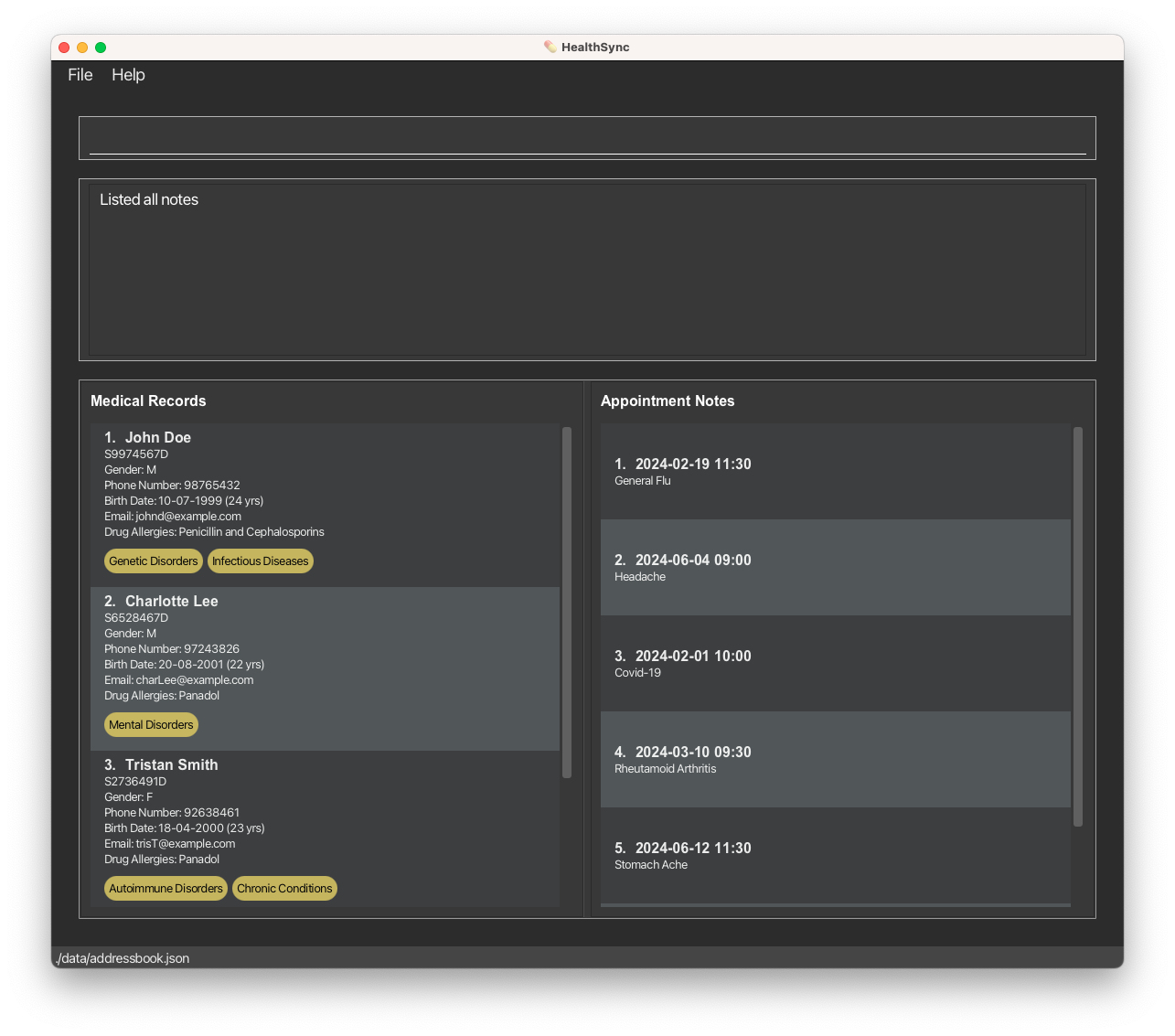
A GUI similar to the below should appear in a few seconds. Note how the app contains some sample data.
-
Type the command in the command box and press Enter to execute it. e.g. typing
helpand pressing Enter will open the help window.
Some example commands you can try:-
list: Lists all patient medical records. -
add ic/S9974943C n/John Mark p/91234567 e/john@email.com g/M b/11-11-1990 d/Paracetamol Allergy i/Infectious Disease: Adds a patient medical record with the details respectively to the application. -
delete 3: Deletes the 3rd medical record shown in the current list. -
clear: Deletes all patient medical records. -
exit: Exits the app.
-
-
Refer to the Features below for details of each command.
Features
 Notes about the command format:
-
Words in
UPPER_CASEare the parameters to be supplied by the user.
e.g. inadd n/NAME,NAMEis a parameter which can be used asadd n/John Doe. -
Items in square brackets are optional.
e.g.n/NAME [g/GENDER]can be used asn/John Doe g/Mor asn/John Doe. -
Items with
… after them can be used multiple times including zero times.
e.g.[i/ILLNESS]…can be used asi/Infectious Diseases,i/Infectious Diseases i/Genetic Disordersetc. -
Parameters can be in any order.
e.g. if the command specifiesn/NAME p/PHONE_NUMBER,p/PHONE_NUMBER n/NAMEis also acceptable. -
Extraneous parameters for commands that do not take in parameters (such as
list,undo,exitandclear) will be ignored.
e.g. if the command specifiesundo 123, it will be interpreted asundo. -
If you are using a PDF version of this document, be careful when copying and pasting commands that span multiple lines as space characters surrounding line-breaks may be omitted when copied over to the application.
Viewing Help Information: help
Provides detailed information on how to use commands within the Healthsync application, facilitating effective management of patient medical and appointment records.
Format:
-
helpLists all available commands along with their usage. -
help COMMANDDisplays detailed help for a specific command. -
COMMANDrefers to any available command in Healthsync for which you seek detailed information.
Examples:
- Entering
helpin Healthsync will display a comprehensive list of all commands, including their formats and brief descriptions, to assist in navigating the system. - Typing
help addwill present detailed information about theaddcommand, including its format, required and optional parameters, and examples of usage.
This enhancement to the help feature allows for more targeted assistance, enabling users to quickly find the information they need for any specific command, in addition to understanding the overall functionality available within Healthsync.
Adding a patient medical record: add
Adds a patient medical record to the system.
Format: add ic/NRIC n/NAME [g/GENDER] b/BIRTHDATE p/PHONE_NUMBER e/EMAIL [d/DRUG_ALLERGY] [i/ILLNESS]...
-
NRICmust be an alphanumeric and it must follow Singapore’s NRIC format ‘[S/T/F/G/M]XXXXXXX[A-Z]’. -
NAMEshould only contain alphanumeric characters and spaces. -
GENDERM, F or exclude from the command for ‘Prefer not to say’ option. *Case-insensitive e.g. m instead of M. -
PHONE_NUMBERshould be in valid Singapore phone number format. Must start with 6, 8, or 9 and be followed by seven additional digits, with no spaces or other characters. -
BIRTHDATEmust be in the form of DD-MM-YYYY and must not be in the future. -
EMAILshould be of the format ‘local-part@domain’.- ‘local-part’ constraints:
- Should only contain alphanumeric characters and special characters excluding parentheses, +_.-
- May not start or end with any special characters.
- ‘domain’ constraints:
- Must end with a domain label at least 2 characters long.
- Must have each domain label start and end with alphanumeric characters.
- Must have each domain label consist of alphanumeric characters, separated only by hyphens, if any.
- ‘local-part’ constraints:
-
DRUG_ALLERGYcan contain alphanumerics, spaces and special characters. Entry of multiple drug allergies should be separated using spaces and special characters, e.g.|. -
ILLNESScould be of the following options - Infectious Disease, Chronic Conditions, Autoimmune Disorders, Genetic Disorders, Mental Health Disorders, Neurological Disorders, Metabolic Disorder, Nutritional Deficiencies, Environmental Illnesses, Degenerative Diseases or Others. You can also type the first few letters / words of the illness name as long it corresponds to a valid name for convenience.
Examples:
-
add ic/S9974944F n/John Doe p/91234567 e/johndoe@email.com g/M b/11-11-1990 d/Paracetamol | Penicillin i/Infectious DiseasesAdds a new patient record with nric ofS9974944Fname ofJohn Doe, phone no. of+65 91234567, gender ofMale, birthdate of11-11-1990, allergy ofParacetamol | Penicillin, and an illness category ofInfectious Diseases.
Listing all patient medical records: list
Displays the list of patients in the application. Each row of patients displays a basic details of the patients (e.g. name, gender, age, illness, phone number)
Format: list
Editing a patient medical record: edit
Edits a particular patient medical record. Users can select which particular detail to be updated.
Format: edit PATIENT_INDEX [n/NAME] [p/PHONE_NUMBER] [e/EMAIL] [g/GENDER] [b/BIRTHDATE] [d/DRUG_ALLERGY] [i/ILLNESS]...
 Tip:
Edit should have at least one parameter / detail to update. Also, nric is not allowed be edited remake the record
if new nric is needed.
Tip:
Edit should have at least one parameter / detail to update. Also, nric is not allowed be edited remake the record
if new nric is needed.
-
Edits the medical record at the specified
PATIENT_INDEX. The index refers to the index number shown in the displayed patient medical record list. The index must be a positive integer 1, 2, 3, … -
NAMEshould only contain alphanumeric characters and spaces. -
PHONE_NUMBERshould be in valid Singapore phone number format. Must start with 6, 8, or 9 and be followed by seven additional digits, with no spaces or other characters. -
EMAILshould be of the format ‘local-part@domain’.- ‘local-part’ constraints:
- Should only contain alphanumeric characters and special characters excluding parentheses, +_.-
- May not start or end with any special characters.
- ‘domain’ constraints:
- Must end with a domain label at least 2 characters long.
- Must have each domain label start and end with alphanumeric characters.
- Must have each domain label consist of alphanumeric characters, separated only by hyphens, if any.
- ‘local-part’ constraints:
-
GENDERM, F or exclude from the command for ‘Prefer not to say’ option.g/with empty argument to remove any gender specification and make it ‘Prefer not to say’. *Case-insensitive e.g. m instead of M. -
BIRTHDATEmust be in the form of DD-MM-YYYY and must not be in the future. -
DRUG_ALLERGYcan contain alphanumerics, spaces and special characters. Entry of multiple drug allergies should be separated using spaces and special characters, e.g.|. allergy previously written. -
ILLNESScould be of the following options - Infectious Disease, Chronic Conditions, Autoimmune Disorders, Genetic Disorders, Mental Health Disorders, Neurological Disorders, Metabolic Disorder, Nutritional Deficiencies, Environmental Illnesses, Degenerative Diseases or Others. A singlei/with empty argument would remove all illness category associated with the medical record. You can also type the first few letters / words of the illness name as long it corresponds to a valid name for convenience. Examples: -
edit 1 n/Cindy Tan p/94505333 e/editedmail@mail.com g/F b/11-11-1991 d/Antibiotic Allergy i/Genetic DisordersEdit the whole patient medical record that has thePATIENT_INDEXof 1. -
edit 1 g/M b/11-07-1999Edits patient medical record that has thePATIENT_INDEXof 1 to have a gender ofMand birthdate of11-07-1999.
Deleting a patient medical record: delete
Deletes a particular patient’s medical records.
Format: delete PATIENT_INDEX
- Deletes the patient medical record at the specified
INDEX. - The index refers to the index number shown in the displayed patient list.
- The index must be a positive integer 1, 2, 3, …
Locating a patient medical record: find
Finds patient whose details contain any of the given keywords.
Format: find [ic/NRIC] [n/NAME] [p/PHONE_NUMBER] [e/EMAIL] [g/GENDER] [b/BIRTHDATE] [d/DRUG_ALLERGY] [i/ILLNESS]
Tip:
Find should have at least one parameter to search.
- Users can search by NRIC, name, phone number, email, gender, birthdate, drug allergy and illness.
- The search is case-insensitive. e.g
hanswill matchHans - The order of the keywords does not matter. e.g.
Hans Bowill matchBo Hans - Only full words will be matched e.g.
Hanwill not match toHans - Patients matching at least one keyword for a specific parameter will be returned (i.e.
ORsearch). e.g.n/Hans Bowill return patients namedHans Gruber,Bo Yang - Multiple search parameters can be combined to narrow down search results (i.e.
ANDsearch). e.g.n/taylor g/mwill return allMalepatients namedTaylor
Examples:
-
find n/JohnreturnsjohnandJohn Doe -
find d/paracetamol i/infectiousreturns all patients with aParacetamolallergy who also have theInfectious Diseasesillness category -
find i/diseases othersreturns all patients withInfectious Diseases,Degenerative DiseasesandOthersillness categories
Listing all appointment notes: list-an
Shows a list of all appointment notes.
Format: list-an
Listing a particular patient’s appointment notes: list-an
Shows a list of a particular patient’s appointment notes.
Format: list-an PATIENT_INDEX
- Lists all appointment notes at the specified
INDEXfor given patient fromPATIENT_INDEX. - The index refers to the index number shown in the displayed patient list.
- The patient index refers to the index number shown in the displayed patient list.
- The index must be a positive integer 1, 2, 3, …
Examples:
list-an 1
Adding an appointment note: add-an
Adds an appointment note to a patient. Please note that the time parameter is in 24-hour format.
- Appointment notes with duplicate timings are permitted to allow doctors to record multiple diagnoses.
- Appointment notes date can be before the date of birth of the patient in the event of a maternal checkup.
Format: add-an PATIENT_INDEX d/DD-MM-YYYY t/HHMM n/NOTE
Tip:
A person can have any number of appointment record (including 0)
Examples:
add-an 1 d/19-02-2024 t/1130 n/General Fluadd-an 1 d/30-12-2023 t/2100 n/Headache
Editing an appointment note: edit-an
Edits an appointment note to a patient. Please note that the time parameter is in 24-hour format.
Format: edit-an PATIENT_INDEX INDEX [d/DD-MM-YYYY] [t/HHMM] [n/NOTE]
- Edits the appointment record at the specified
INDEXfor given patient fromPATIENT_INDEX. - The index refers to the index number shown in the displayed patient list.
- The patient index refers to the index number shown in the displayed patient list.
- The index must be a positive integer 1, 2, 3, …
Examples:
edit-an 1 1 d/19-02-2024 t/1230 n/General Fluedit-an 1 2 t/2100 n/Stomach Virus
Deleting an appointment note: delete-an
Deletes the specified appointment note from a patient.
Format: delete-an PATIENT_INDEX INDEX
- Deletes the appointment record at the specified
INDEXfor given patient fromPATIENT_INDEX. - The index refers to the index number shown in the displayed patient list.
- The patient index refers to the index number shown in the displayed patient list.
- The index must be a positive integer 1, 2, 3, …
Examples:
-
list-an 1followed bydelete-an 1 2deletes the 2nd appointment note from the 1st patient.
Clearing all entries: clear
Clears all entries from the patient medical records.
Format: clear
Undo previous commands: undo
Undo the most recent command if any (Specifically patient medical record and appointment note related commands).
Here are the list of undoable commands:
addeditdeleteadd-anedit-andelete-an
Format: undo
Archiving Data Files: archive
Safeguards your current database by creating a timestamped snapshot, ensuring data integrity during significant updates or before database clearance.
Format:
archive
- This command does not require any parameters.
- Upon execution, it generates a snapshot file named
addressbook_YYYY_MM_DD_T.jsonwithin thedatafolder. This naming convention includes the current year (YYYY), month (MM), day (DD), and a timestamp (T) to ensure uniqueness and easy identification of the backup.
Functionality:
-
Creating a Snapshot: Running the
archivecommand will automatically save a copy of the currentaddressbook.jsonfile. This snapshot is a full backup of your database at the time of execution, allowing you to preserve data before making major changes or clearing the database. -
Restoration: If you need to revert to a previously archived state, manually navigate to the
datafolder. Here, you can rename and replace the currentaddressbook.jsonwith the desired snapshot file. This process restores your database to the snapshot’s saved state.
Examples:
- Executing
archiveon April 4, 2024, at 3:00 PM will create a snapshot file namedaddressbook_2024_04_04_T150000.jsonin thedatafolder. This file represents a complete backup of the database as it existed at that moment.
Note:
To restore from an archive, ensure you correctly rename the desired snapshot file to addressbook.json and replace the existing file in the data folder. This manual step is crucial for successful restoration and requires careful handling to avoid data loss.
By utilizing the archive command, users can confidently manage and implement significant changes to their database, knowing their data is securely backed up and can be restored if necessary.
Exiting the program : exit
Exits the program.
Format: exit
Saving the data
HealthSync data are saved in the hard disk automatically after any command that changes the data. There is no need to save manually.
Editing the data file
HealthSync data are saved automatically as a JSON file [JAR file location] /data/addressbook.json. Advanced users are
welcome to update data directly by editing that data file.
Legacy Naming Conventions
Due to historical reasons, the files created and managed by HealthySync are still named using the legacy application’s naming convention, such as addressbook.json. This naming is maintained to ensure compatibility and ease of transition for users and developers familiar with the previous application. Future updates may include renaming these files to reflect the new application name more closely.
 Caution:
If your changes to the data file makes its format invalid, HealthSync will discard all data and start with an empty data file at the next run. Hence, it is recommended to take a backup of the file before editing it.
Caution:
If your changes to the data file makes its format invalid, HealthSync will discard all data and start with an empty data file at the next run. Hence, it is recommended to take a backup of the file before editing it.Furthermore, certain edits can cause the HealthSync to behave in unexpected ways (e.g., if a value entered is outside of the acceptable range). Therefore, edit the data file only if you are confident that you can update it correctly.
FAQ
Q: How do I transfer my data to another Computer?
A: Install the app in the other computer and overwrite the empty data file it creates with the file that contains
the data of your previous HealthSync home folder.
Known issues
-
When using multiple screens, if you move the application to a secondary screen, and later switch to using only
the primary screen, the GUI will open off-screen. The remedy is to delete the
preferences.jsonfile created by the application before running the application again.
Command summary
| Action | Format, Examples |
|---|---|
| Add Patient Medical Record |
add ic/NRIC n/NAME [g/GENDER] b/BIRTHDATE p/PHONE_NUMBER e/EMAIL [d/DRUG_ALLERGY] [i/ILLNESS]... e.g. add ic/S9974944F n/John Doe p/91234567 e/johndoe@email.com g/M b/11-11-1990 d/Paracetamol Allergy i/Infectious Diseases
|
| List All Patient Medical Records | list |
| Edit Patient Medical Record |
edit PATIENT_INDEX [n/NAME] [p/PHONE_NUMBER] [e/EMAIL] [g/GENDER] [b/BIRTHDATE] [d/DRUG_ALLERGY] [i/ILLNESS]... e.g. edit 1 g/M b/11-07-1999
|
| Delete Patient Medical Record |
delete PATIENT_INDEXe.g., delete 3
|
| Find Patient Medical Record |
find [ic/NRIC] [n/NAME] [p/PHONE_NUMBER] [e/EMAIL] [g/GENDER] [b/BIRTHDATE] [d/DRUG_ALLERGY] [i/ILLNESS]e.g., find n/James Jake
|
| List All Appointment Notes | list-an |
| List a Patient’s Appointment Notes |
list-an PATIENT_INDEX e.g., list-an 1
|
| Add Appointment Note |
add-an PATIENT_INDEX d/DD-MM-YYYY t/HHMM n/NOTEe.g., add-an 1 d/30-12-2023 t/2100 n/Headache
|
| Edit Appointment Note |
edit-an PATIENT_INDEX NOTE_INDEX [d/DD-MM-YYYY] [t/HHMM] [n/NOTE]e.g., edit-an 1 1 d/19-02-2024 t/1230 n/General Flu
|
| Delete Appointment Note |
delete-an PATIENT_INDEX NOTE_INDEXe.g., delete-an 1 2
|
| Help | help |
| Clear | clear |
| Undo | undo |
| Archive | archive |
| Exit | exit |